4/02/2026

Key Takeaways
AI search impacts traditional traffic: while some AI tools resolve queries directly within their interface, others drive highly-qualified traffic that requires advanced tracking to measure effectively.
Unified tracking requires customisation: Google Analytics 4 often misclassifies AI traffic as standard referrals, making it essential to create a dedicated "AI Search" custom channel group for clear analysis.
Google search requires a dual approach: link clicks from Google AI Overviews are currently indistinguishable in GA4, necessitating the use of Google Search Console's "Search Appearance" filters for detailed visibility.
With the exponential growth in the use of AI tools like ChatGPT, Gemini, Mistral and Perplexity, the traffic that traditionally came to hotel websites from conventional search engines like Google or Bing has also been affected to some extent. Some of these AI searches result in no clicks to the website, mainly because the user finds the answer to their question directly without having to browse to external websites (so-called zero-click results).
But other user searches require further investigation. How can we see the users who arrive at our websites from these tools? What do they do once there? And above all, do they make a reservation?
Google Analytics: Referral Traffic
Google Analytics (GA4) categorises traffic based on its source. From its source/medium reports, we can see what comes from search engine results (organic), from our paid campaigns (CPC/PPC), or even from another website (referral).
Currently, GA4 usually classifies visits from ChatGPT, Gemini, or Perplexity as "referral" since they come from an external link. In the worst-case scenario, they are classified as "direct" if the referral link isn't passed correctly. The current problem is that these tools don't follow a standard, so we can see different formats for the same source.
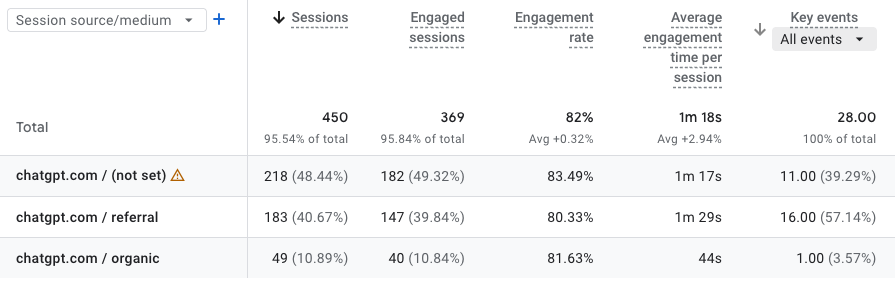
So, how can we view this traffic in a cleaner and more unified way? We can create a custom channel that includes all the sources coming from AI tools, allowing us to analyse user behavior just like from any other channel.
Create the "AI Search" Channel in GA4
The default channels in Google Analytics categorise traffic as Organic Search, Paid Search, Organic Social, etc. Therefore, to ensure your reports clearly show traffic from AI, it's recommended to create a new custom channel that consolidates all referrals coming from AI.
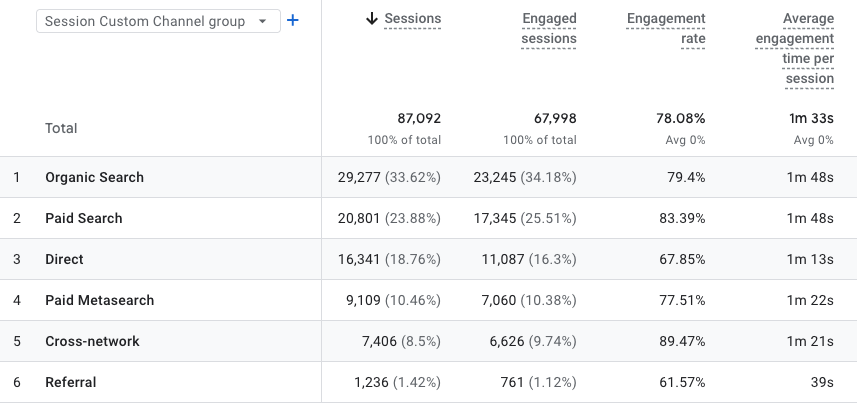
To do this, follow these steps:
- Go to Admin > Data display > Channel Groups.
- Click on the default group (Primary Channel Group) and select "Copy to create a new one" (never edit the original directly).
- Give it a name, for example: Custom Channel Group.
- Click Add New Channel and name it "AI Search".
- Configure the condition using RegEx (Regular Expression):
- Dimension: Session Source.
- Operator: Matches the regular expression.
- Value: ^.*ai|.*\.openai.*|.*copilot.*|.*chatgpt.*|.*gemini.*|.*perplexity.*|.*anthropic.*|.*claude.*$
IMPORTANT! Re-order the channels. Drag "AI Search" to the top of the list (above Referral). GA4 applies rules from top to bottom; If you leave it until the end, it will get stuck in the common Referral channel.
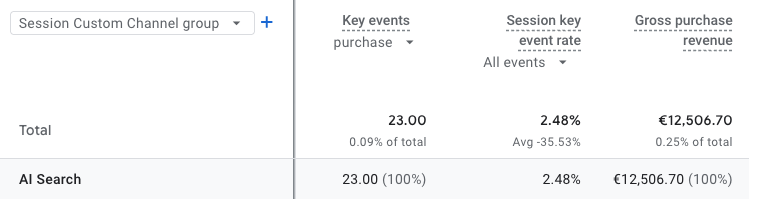
Now, once created, we can see the behavior of these users by analyzing the number of sessions, page views, and even whether they have completed a booking at your hotel.
This new channel will be applied automatically and retroactively, so you will be able to see data from dates prior to the day it was created.
The Challenge: Google Search vs. AI Overviews
Unlike ChatGPT, which has its own domain like chatgpt.com, Google AI Overviews and Google AI Mode are integrated within Google Search itself. Therefore, when a user clicks on a link within an AI Overview, the referrer remains google.com. For Google Analytics, this simply counts as "google/organic," so it's currently impossible to differentiate between the various results.
The solution will be Google Search Console. Google has begun testing "Search Appearance" filters, which will include the "AI Overviews" category.
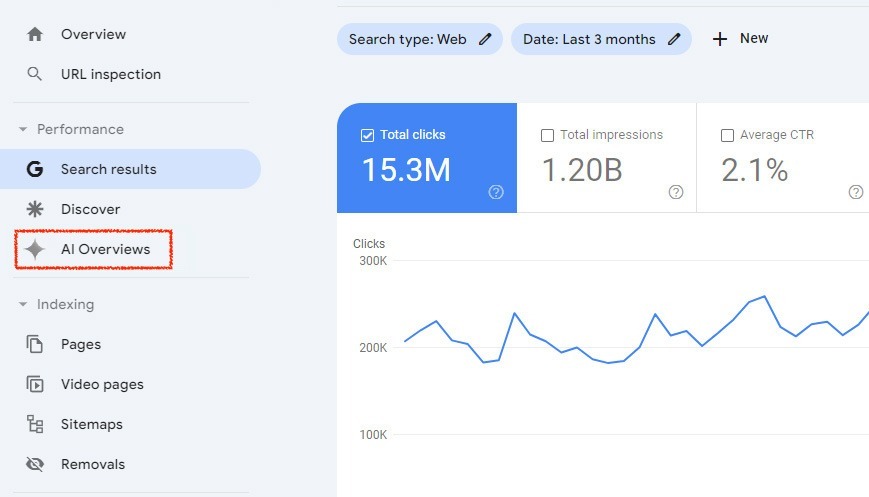
However, this will still be a limitation at present, as these reports show clicks and impressions, but don't tell you what those users did on your website once they arrived (conversions, time spent, etc.).